Shop Floor Automations (SFA) is a big fan of Modern Machine Shop Magazine. We always appreciate when our pieces make the cut for this prestigious publication.

Here are our top four favorite recent issues:

March 2019 – Rise Up Industries, an organization in San Diego County near our corporate office, made the pages of this publication. SFA worked closely on this collaboration. You can see the original length article on the MMS blog.

June 2018 – We made the 90th-anniversary issue. Fun fact – this was the same year as our 20th anniversary! Our full-page spread on our LAN-USB Hardware device discussed adding Ethernet and USB to CNCs. Because the issue featured a retrospective look at shop floor technology, we were humbled to be included.

January 2018 – A crucial productivity tool for our customers at R&D Manco is machine monitoring. “Gathering basic data on machine status, and studying the data to diagnose and remedy the causes of non-cutting time, has been the shop’s most powerful resource for realizing machining capacity improvements.”

October 2017 – SFA Customers at Stollen Machine were dropping programs because of old cabling. So in order to increase productivity, they invested in wireless RS232 units. This gave them back 15% more time daily, according to this case study.

Check out our other published pieces for more product insight. Ready to get started? Call (877) 611-5825 or fill out a contact form

Wondering what the best industrial automation solutions are for your shop floor? The biggest factors to focus on are your budget, needs, and the equipment you want to improve performance for.

Check out our guide for popular brands of manufacturing equipment and what you can do with them! We also recommend contacting us with your make/model information, as well as checking out our YouTube channel.

What equipment is compatible with MTConnect? We have a detailed compatibility guide.

HAAS MACHINES:

  • Software for CNC networking, OEE monitoring and more
  • Replace Haas floppy drives with plug and play ability
  • Transform RS232 ports to USB

FANUC MACHINES:

  • Compatible with MTConnect for machine monitoring
  • Drip-feeding software and hardware
  • USB hardware & special cables

DOOSAN MACHINES:

  • Software to track OEE or control/send programs
  • Replace floppy drives or upgrade to USB
  • Go from Serial to Ethernet for data transfer

MAZAK MACHINES:

  • DNC software and machine monitoring
  • USB & LAN hardware for Mazatrol (CMT)
  • Replace floppy drives

OKUMA MACHINES:

  • Monitor uptime/downtime
  • Drip-feed hardware and software options
  • Floppy core replacement with rebates available

FADAL MACHINES:

  • USB hardware – portable and pendant
  • Add Ethernet functionality
  • Ask about software for this equipment

FAGOR CNC MACHINES:

Have equipment not listed here that you want solutions for? Get in touch with us! Call (877) 611-5825 or fill out a contact form

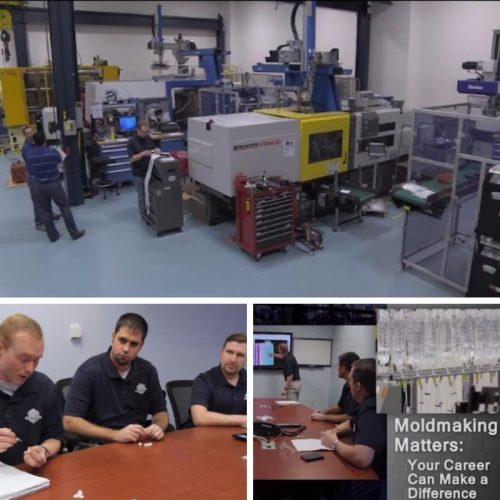
Plastic Manufacturing
Credit to Gardner Business Media

Moldmaking is a rewarding area in our industry to work within. Plastic manufacturing touches many facets of our daily lives. Just ask those who work in the field!

“Moldmaking and injection molding is at the very heart of the plastics industry,” says Nishit Shah, Mold Design Engineer at Nypromold.

Moldmaking Technology released an in-depth piece where they interviewed plastic manufacturers. Nypromold was the highlighted company in the article.

“What brought me to manufacturing was the ability to use advanced technology,” says Keene Huntoon, a CNC Machinist at the company. “What keeps me here…is my job is a crucial step in making properly-working medical devices.”

“We take plastic pellets, melt them in the machine, and inject them into the mold,” says Amber Zapatka, Plastics Engineer. Holding both a Bachelors and Masters in Plastics Engineering, she states her work is like a puzzle.

“What’s the best way and fastest way to make good parts each time?” Amber and other employees in her field are constantly looking for ways to improve their processes.

What are the best ways for plastic manufacturers to increase their productivity? Check out these resources below:

  • Three Reasons Moldmakers need IIoT ARTICLE
  • Reducing Moldmaking Downtime ARTICLE
  • Why DNC Software is Crucial for Moldmakers ARTICLE

Ready to increase productivity? We service moldmakers, CNC machine shops, metal fabricators, and more manufacturers within our industry. Call (877) 611-5825 or have us contact you

According to SME’s ToolingU Manufacturing Management Supervisor Essentials Course, just because you’re a manager doesn’t automatically make you a leader. Leaders cope with change and complexity.

Have you taken the time to lead your shop floor recently? Do you know things needs to change?

Typically, those who need automation tools are the machinists, production workers and shift supervisors on the shop floor. Production managers also find these solutions, but often, those who are directly making parts bring their requests to the production manager.

The best approach for the production manager or anyone wanting change would be to present these solutions to decision makers at the company. Usually, the Quality, Engineering and Maintenance departments above Production Management won’t have this authority, so let’s go further.

The first step is proving the value of automation solutions to Departments such as Purchasing, Finance/Accounting or even as high up as the President/Owner. You can check this article from MFG Talk Radio on proving manufacturing ROI to help in this mission.

Other than showing how manufacturing automation can help your organization, here are other steps you can take to improve production:

  1. Situational Analysis – Identify the shop’s areas of success and where improvement is needed within the organization initially.
  2. Correct Project Planning – The best process for planning projects is to define objectives, determine the realistic scope/budget, create a work breakdown structure, then delegate approved tasks out. If you’re not in management, draft a plan to present to a higher-up.
  3. Forecasting – Can you predict or measure demand and control costs? Looking at production for the next three to five years may seem like a long time frame, but this is the most common strategic plan used.
  4. Organization & Planning Tools – The correct resources will help your company’s longevity. They range from budgeting, charts, and scope, to your staff and staffing choices.
  5. Monitor & Control – Yes, we always recommend machine monitoring, but there are other observations to make. Once a month, curate productivity reports. Do operations research and evaluate your schedules based on historical data.

Ready to move forward? Call (877) 611-5825 or fill out an online contact form.

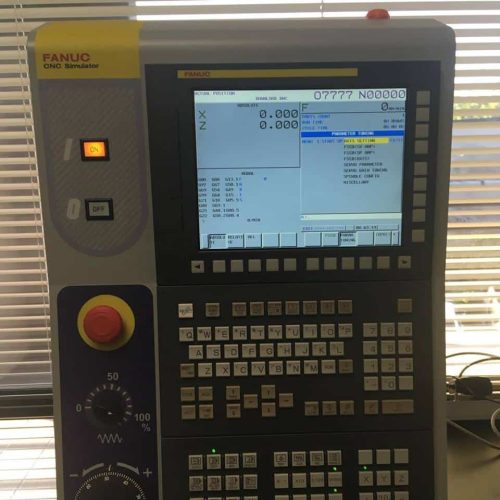
A front view of a Fanuc CNC controller, which is being monitored with machine monitoring software.

Manufacturers with Fanuc CNC machines have specific needs. Especially when it comes to the subject of shop floor automation.

Here are some quick resources:

Can you do machine monitoring with Fanuc equipment? Yes! DataXchange machine monitoring supports Fanuc FOCAS. You can monitor this equipment on-premise or via the Cloud.

Is Fanuc FOCAS similar to MTConnect? MTConnect enables equipment to provide data in structured XML versus proprietary formats. FOCAS is either Ethernet-based or sourced via the Fanuc FOCAS HSSB driver. Library files (.dll) are accessed by applications that retrieve the data.

Controls with Fanuc FOCAS: Fanuc FOCAS has two types: FOCAS 1 and FOCAS 2. Controls with Fanuc FOCAS include series Oi, 15, 15i, 16, 16i, 18, 18i, 21, 21i, 30i, 31i, 32i and power mate i.

Fanuc specific solutions:

Fanuc Alarm Codes: Common FANUC alarm codes are 086 – no hardware handshaking occurring. Also, look for DR Signal Off, which means your cable connection is bad. Another common code is 073, where the program number has already been used.

Need Fanuc Parameters? Have more specific questions? Call (877) 611-5825 or fill out a contact form so we can get back to you

An upper view of a shop floor with various CNC machines in view and several employees hard at work. There is an overlaid silhouette of someone at a desktop computer with the SFA logo on it.

Planning to automate CNC machines or other manufacturing equipment? Here are three steps before starting:

First, Create a Healthy Technology Relationship: “These tools have been developed not for nefarious reasons, but to improve the way we do business or the way we live.” Production Machining Senior Editor Chris Felix explains this topic in their April 2018 issue.

Monitoring equipment and implementing other automation tools is not meant to penalize or micromanage operators. “The implementation of data-driven manufacturing…collects data about and reports on the effectiveness of the manufacturing process. Data from tooling can help to refine cutting parameters to improve accuracy and reduce scrap.”

Basically, any shop floor automation solutions will involve an investment. You want to make sure that those using machines and equipment will take advantage of these tools.

Next, Consider Demand-Driven Manufacturing: “This has become the new market norm because of advancements in real-time analytics and IIoT,” says Stefan Krauss in January/February 2017 Today’s Medical Developments issue. “Manufacturing companies will need to integrate real-time demand information into their operation or risk losing…to the digital leaders that do.”

“Start with an internal audit of end-to-end operations to identify weak spots and insertion points where new features can be introduced.” Doing this will allow you to evaluate what goals are obtainable on your shop floor.

Then, Integrate IIoT: “An IIoT platform is a set of hardware and software facilities that assist and support [an] application for industrial companies using the internet to connect devices and equipment,” says Mark Albert in the Modern Machine Shop November 2017 issue.

“The use of the internet is now commonly called the industrial internet of things. Such platforms may provide an operation environment, computer processing capability, data storage structure, and program building blocks for application developers.”

Ready to start the conversation? Call (877) 611-5825 or fill out our contact form

A USB Connect Portable being held while being used to configure a Haas CNC, a USB Connect Pendant mounted to the side of a CNC controller, a USB Connect Pendant mounted above the screen of a CNC machine controller, and a USB Connect pendant mounted to a front panel of a CNC machine.

Modernizing your manufacturing equipment is easier and more affordable than you may otherwise assume. Operators love USB to RS232 transfers of machine programs for many reasons.

This CNC upgrade hardware helps machinists save time, it assists with basic program revision control and the devices that perform these actions help increase memory. Also, since these devices are positioned close to the control, it allows the machine to run at its maximum baud rate.

Here are quick videos with easy steps in which to perform USB machine transfers:

The devices come in pendant models that are dedicated to one machine. There is also the popular portable model, which saves machine operators even more time.

Our list of CNC machines that USB Connect hardware is compatible with includes Siemens, Anilam, Bridgeport, Cincinnati, Fadal, FANUC, Haas, Yasnac, Brother machines, Mitsubishi, and others. Special models also perform Mazak and Switchbox functions.

Ready to learn more? Call (877) 611-5825 or fill out a contact form

Operators with legacy CNC machines experience RS232 communication limitations. Because of this, they want to know if RS232 to USB or RS232 to Ethernet upgrades possible and affordable.

You can easily modernize manufacturing equipment with RS232 ports. The LAN Connect device helps with Ethernet abilities.

Benefits of this LAN hardware device:

  • Replace RS232 cabling or DNC software for smaller shops
  • Connect to nearly any machine control with built-in CNC communication firmware
  • Mount inside the pendant or reverse-mouse with a DIN rail
  • The device is assigned an IP address – connects to any standard Ethernet cable from the corporate network
  • Combine Ethernet abilities, increased program storage (via USB stick or internal memory), and larger programs with the LAN-USB Connect

What are the best benefits of this hardware? Run at a maximum baud rate by connecting the device to the CNC controller.

Because of this setup, operators save time versus running from PC to CNC to begin machine operation. IT Departments also prefer this option when they dislike interfacing with serial cabling and complicated DNC software.

So now we come to pricing – the cost to add Ethernet functionality from machine tool builders can be expensive. This third party upgrade is a minimal cost in comparison.

Ready for a quote? Call (877) 611-5825 or fill out an online contact form