

Tag Archive: PCMCIA media cards
CNCs That Are Not Yet Ready to Retire
Comments Off on CNCs That Are Not Yet Ready to RetireLengthen Useful Life with CNC USB Upgrades
You have a machine that is 30+ years old. It’s been there since the early days, long before Industry 4.0 was a buzzword and before wireless file transfer was even imaginable. It may be even going by the affectionate nickname of “Trusty.”
Despite its age, the equipment runs like a dream. Its spindles are still tight, axes still accurate within a few microns and its rugged build could chew through titanium like butter. Operators swear by its consistency. “It just knows what to do,” one would say. “Never crashes, never fusses.”
But there’s a catch. And it’s a costly one.
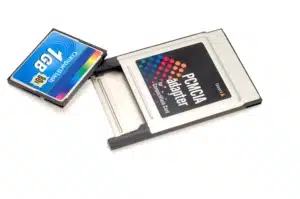
The machine’s control system, still original, can only receive CNC programs via two obsolete methods: a floppy disk drive and a Type I PCMCIA card slot. In an age when everything else on the shop floor has moved to USB, Ethernet or RS232 serial transfer, Trusty’s data interface is like a rotary phone in a world of smartphones.
The Bottleneck Begins
Every time a new G-code program needs to be loaded – be it a customer revision, toolpath tweak or entirely new part setup – one of the operators has to break from their routine to hunt down one of the two working 3.5″ floppy disks still in circulation. They probably guard those floppies like gold; one might be labeled “A-Shift Only” in Sharpie.
File sizes have to be trimmed meticulously. Programs have to be split into segments due to the 1.44MB limit. Worse still, perhaps the old laptop that supports the PCMCIA cards only works when plugged into a wall and booted in Safe Mode. You’re constantly worried that it will blue-screen in the middle of a critical job for an already-dissatisfied customer. The resulting delay could push an entire shift back, cause an overnight rush and lead to missed delivery windows. The warnings are clear: the machine isn’t failing mechanically, but it is failing logistically.
Good Machine Health Can Still Be Costly
Even if the machine can still “run well,” the time lost in file prep, operator retraining and manual transfers adds up. Even one mistake in file versioning – say, loading the wrong program because the floppy labels have rubbed off – means scrapping parts, rework or worse, customer complaints or attrition.
Then there’s compliance. Traceability and control of removable media may be a major priority, particularly for manufacturers with Federal Contract Information (FCI), yet the tracking of file changes and revisions on a machine that relies on physical media is like trying to manage ERP through Post-it® Notes.
If these challenges sound eerily familiar, you’re among peers. But replacing your aging CNC equipment just to modernize data communication is rarely feasible for most operations. IndustryWeek published this shared opinion from one operations manager at a Midwestern automotive components plant: “We can’t justify scrapping equipment that still produces quality parts just because it lacks connectivity.” Instead, many are choosing to retrofit their legacy equipment – with tangible results.
Retrofitting for Longevity
The process of upgrading floppy drives and PCMCIA cards on older CNC machines can be surprisingly simple, that is, with the right hardware and manufacturing integrator. Shop Floor Automations (SFA), which specializes in delivering machine connectivity through a full suite of hardware and software solutions, refers customers to its USB Connect device to improve obsolete CNC file program transfer processes without retiring the asset. “It’s a ruggedized, plug-and-play unit that lets you load and save programs via USB just like you would on newer machines. You install it on the CNC and connect it to your machine’s RS-232 port, insert a USB flash drive containing your programs and send the file directly into the CNC control. There’s no software setup, no tweaking parameters. It behaves exactly like a serial communication tool, only far faster and easier to use,” explains Greg Mercurio, president of SFA.
These benefits make CNC USB upgrade retrofits increasingly attractive, but Mercurio advises a careful connectivity approach. “Choosing the wrong device or the wrong partner can quickly turn productivity or efficiency issues into unexpected downtime, safety or security issues. Cutting costs and attempting implementations without a well-crafted plan or experienced installer isn’t worth the risk,” says Mercurio.
A New Lease on Machine Life
Programs can now be sent directly from your shop’s programming workstation to Trusty and other older CNC machines, removing the need for floppies, patch cables or ancient laptops. The operator loads programs as if they used a removable USB thumb drive, but without all the marching back and forth between the programming office and CNC.
With this CNC USB upgrade device in place, operators can be empowered to focus on quality parts, not workarounds. Engineering can feel confident in a more streamlined CNC program transfer process. IT can rest easy with full awareness of this process, as well as the roles and responsibilities that result in a compliant and secure course of action. And long-standing equipment, like Trusty, can still run just as well, only now, with the tools to keep pace with the rest of the floor. Learn more about upgrading your existing machinery with expert assistance from SFA technicians by reaching out today.