Skip to Content
Exit

Tag Archive: touch hmi

Flatten the HMI Friction: How Your Browser Unlocks a Smarter Shop Floor

Comments Off on Flatten the HMI Friction: How Your Browser Unlocks a Smarter Shop Floor

In a manufacturing world that never sleeps, where uptime is king and every minute counts, the smallest friction can ripple across an entire operation. If you’ve ever juggled machine data, NC file transfers and production metrics while also trying to modernize aging infrastructure, then you know: even well-oiled systems can feel stuck in the past.

That’s why a quiet but important piece of software is giving shops a new option. It starts with something deceptively simple: your web browser.

Tethered to a Terminal

Plant facilities across America – those places where high-speed CNCs carve out precision parts day and night – are filled with operations folks tired of the extra steps, the workarounds and the security risk of client-server Human-Machine Interface (HMI) software. Managing CNC file transfers mean hopping between terminals, dealing with clunky software installs and coordinating with IT every time a patch is needed. It can be exhausting.

Accessing CNC programs through Touch HMITeams that rely on Predator DNC and MDC software as the backbone to their operation can find that their HMI interface, while touch accessible, is rigidly tethered to specific hardware and software, and not built for a world full of ruggedized iPads and remote monitoring.

Web-based HMIs offer a compelling solution. By enabling access to machine data through standard web browsers, they eliminate the need for specialized software installations. This allows operators and managers to monitor and control equipment from virtually any device – be it a desktop in engineering or a tablet on the production floor.

From Screens to Situational Awareness

At first glance, pWidgets Browser HMI doesn’t look flashy. It looks like something designed by people who know what shop floor teams actually need: fast access to files, real-time data and easy navigation for fingers operating some of your most expensive assets.

Suddenly, the same tasks that previously required bouncing between terminals can happen from a tablet or even a smartphone. Need to transfer a program to a CNC across the floor? A few taps and done. Want to see a machine status without leaving your desk? There it is — live data, customizable, browser-based and secure.

It’s not just convenient. It’s tranquilly transformative.

pWidget Browser HMI screenshot

With client-server HMIs, a touchscreen hardware failure may require full device replacement or extended downtime. A web-based HMI grants access to any device with browser capabilities so there’s less IT overhead and a faster path toward uptime.

The Bigger Picture for IT and Operations

For IT leaders, the shift can be almost invisible — in a good way. No client software installs. No new infrastructure. Permissions can flow directly from the existing Windows Service accounts so there’s fewer vulnerabilities to patch, less friction with user access and smoother scaling across multiple sites.

“The smaller the attack surface, the easier it is to protect.”

— Fortinet

From an operations perspective, the win is clear: faster response times, better visibility and more flexibility for teams who are constantly adapting to changes on the floor.

And perhaps most importantly, pWidgets brings modern access to an environment that’s often stuck behind the glass of legacy systems.

CNC Control with Web Based HMI

One Step Toward a Smarter Shop Floor

Incorporating web-based HMIs, like pWidgets, into your manufacturing operations isn’t just about keeping up with technological trends – it’s about positioning your facility for greater agility, efficiency and competitiveness in a rapidly-changing industry landscape that demands maximum quality output for every minute.

For more information on web-based HMI and how they can enhance your manufacturing operations, contact the software experts at Shop Floor Automations.

Tag Archive: touch hmi

SFA: Your Top Predator Software Reseller For 20+ Years

Comments Off on SFA: Your Top Predator Software Reseller For 20+ Years

PDM, MDC and DNC software are among the highest-sought Predator solutions supported by the manufacturing integrator

Shop Floor Automations (SFA), a manufacturing integrator specializing in digitally transformative hardware, software and support solutions, announces its exclusive achievement as the top reseller of Predator software since 2004. This significant milestone represents the integrator’s deep industry and technical expertise and unwavering commitment to customer success by serving thousands of North American manufacturers of aerospace and defense, automotive, oil and gas, heavy equipment and medical device products.


“Predator software is a renowned provider of manufacturing automation solutions and leader in Industry 4.0, Industrial Internet of Things (IIoT), digital factory and lean manufacturing,” says Greg Mercurio, president and founder of SFA. “By coupling these solutions with the excellent service, skillset and knowledge of our technical team, our customers realize tangible gains and have come to rely on us for all their automation needs.”

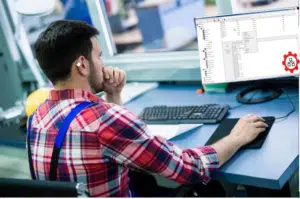
Engineer working with DNC Software at his desk.

Shop Floor Automations has served manufacturers as their premier Predator Software reseller for 20 years.


Robert Jackson, a manufacturing engineer at Flowco Production Solutions, shared his DNC experience in an SFA customer success story.


“I’m responsible for helping to design high-quality parts and manage all the planning for manufacturing,” reported Jackson. “Predator DNC gives me the ability to spend my day doing what I’m supposed to be doing.”


Today SFA offers the following suite of Predator Software solutions:


  1. Predator DNC (Direct Numeric Control) is a robust DNC solution designed to simplify and automate the process of managing CNC programs to ensure secure, reliable and efficient program transfer to CNC machines.
  2. Predator MDC (Machine Data Collection) is an advanced manufacturing data collection system that enables real-time monitoring and analysis of machine performance, production metrics, and downtime, thus empowering manufacturers to optimize processes and maximize productivity.
  3. Predator PDM (Product Data Management) is a comprehensive solution for managing and controlling manufacturing documentation, including CAD/CAM files, setup sheets, work instructions and more, to streamline collaboration, version control, and compliance.
  4. Predator CNC Editor is a powerful editor for CNC program editing, revision control, and backplotting, equipped with features such as syntax highlighting, intelligent search, and customizable templates to simplify programming tasks and ensure code accuracy.
  5. Predator Touch HMI (Human Machine Interface) is designed to enhance operator efficiency and productivity by providing easy access to machine status, job information, and process parameters via touch-enabled interfaces.


For more information about SFA and Predator Software to help give your business a competitive edge, call 619-461-4000 or visit www.shopfloorautomations.com.


ABOUT SHOP FLOOR AUTOMATIONS

Founded in 1998, Shop Floor Automations (SFA) is a manufacturing integrator specializing in digitally transformative hardware, software and support solutions to increase the productivity, efficiency and profitability of plant facilities throughout North America.


Shop Floor Automations has been a trusted reseller of Predator Software for 20 years, and we encourage you to contact our team at any time to find software solutions that give your business a competitive edge. For more information about SFA and Predator Software or to add intelligent automation to your shop floor for better communication, control and improvement, contact Shop Floor Automations at www.shopfloorautomations.com.

Tag Archive: touch hmi

Avoid the Rabbit Hole of Fixes for Antiquated DNC Software

Comments Off on Avoid the Rabbit Hole of Fixes for Antiquated DNC Software

Your aged CNC machines and legacy DNC software can work fine…until they don’t. Maybe the PC communicating to the machines starts dropping characters while transmitting the NC code, scrapping parts being machined if not caught by the operator. Or the hardware that has been in place for years fails, sending you on a painful and labor-intensive search for a fix.

You’re not alone. There are countless online machine forums in which IT, operations and engineers embark on such a mission to find the right parameters, mappings, connections or other ways to solve their problem stemming from an antiquated DNC software setup. This can often be the impetus for Original Equipment Manufacturers (OEMs), contract manufacturers and job shops to re-evaluate their entire DNC solution.

One professional wrote about their DNC issue on a Practical Machinist forum, “I am trying to set up communication between OKUMA LB15 OSP5000 and a PC…the machine was connected to an ancient PC with old DNC software running on DOS, and it worked fine until the PC had perished.”

The Power of DNC System Integration

But a lot has changed among Predator DNC systems over the past years that can make teams consider upgrading even before reaching a point of failure. Even more so, the integration of modern DNC with other solutions, such as Production Data Management, Manufacturing Data Collection and Touch HMI, can streamline manufacturing data across applications – something legacy DNCs typically cannot support.

The benefit of such a proactive approach is often improved CNC workflow efficiency and productivity. Here are a few recent DNC enhancements that have helped manufacturers realize these benefits by simplifying DNC CNC program management and manufacturing data control.

  1. Wide OS and Database Support: Modern DNC solutions, like Predator DNC, have added support for Windows 2019 Server, including x64 editions, and compatibility with Microsoft SQL Server 2022 and SQL Server 2022 Express. They should also work with Windows 10 and Windows 11 to ensure seamless integration with the latest operating systems and database technologies so you can avoid security risks, elevated IT costs and industry compliance concerns with CMMC 2.0 and other requirements.
  2. Enhanced CNC Equipment Support: Manufacturers migrating to a new DNC or upgrading their current version can take advantage of new protocols for Fanuc Focas and MoriSeiki to facilitate the serial transfer of Cincinnati Press Brake and Punch Press programs, for example, through one central server.
  3. Machine Error Log Centralization: Up-to-date DNC solutions provide access to all command errors in a single machine-specific error log to easily track errors and troubleshoot issues. This consolidation of errors provides transactional visibility across shifts to allow for consistent support on the floor.
  4. Greater Security and Control: For manufacturers in particularly security-sensitive industries, like aerospace, medical and defense, upgrading to a modern DNC solution can enable you to securely access and manage the “EditLock” key switch on a machine tool through the DNC to lock and unlock CNC memory so you can effectively:
    • Control edits of G-code on machine tools
    • Eliminate physical edit keys
    • Report lock, unlock, and sending activity
    • Enable maintenance control with an override switch to disable

At the same time, automatic compression, encryption, and batch file operations features of advanced DNC solutions grant heightened security and control over CNC communication – which is critical when CNC controllers that use outdated Windows OS are left behind when connecting them to the corporate network. A well-designed, secure DNC enables such CNC to remain on the network by installing a small executable on the CNC and bypassing the domain requirements.

  1. An Intuitive User Experience: Modern DNC systems tend to have refreshed user interfaces with color schemes and toolbar buttons that offer an intuitive user experience. Other enhancements, such as improved FTP support, including passive mode and automatic file deletion, simplify the file transfer processes for manufacturers, while comprehensive online help resources give users the self-directed guidance they need to maximize productivity.

These developments of the latest DNC software can be reason enough to upgrade your existing setup. Through the integration of a modern DNC system with other manufacturing applications under one solution, however, manufacturers can experience even more efficiency and productivity on the floor.


Upgrade Your Predator DNC Software Today!

At Shop Floor Automations, we are proud to be the top distributor of Predator software in the United States. We strive to provide custom DNC software solutions that will streamline your operation and boost productivity. Contact us at any time to discuss your software, hardware and machine monitoring needs.

Tag Archive: touch hmi

Manufacturing News – June 2016

Comments Off on Manufacturing News – June 2016

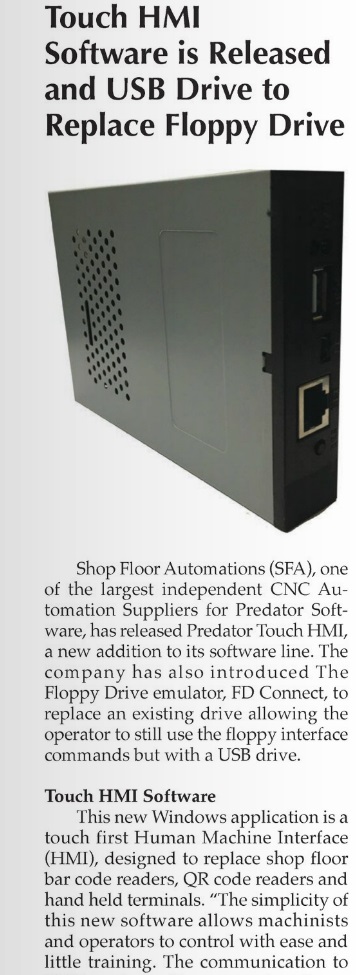
A clipping of an article about SFA and Touch HMI Software, accompanied by an angled view of a Floppy Drive Emulator.

Manufacturing News – June 2016

Shop Floor Automations was featured in Manufacturing News this past month of June 2016. In the article, we spoke about Touch HMI Software from Predator, as well as our Floppy Drive Emulators.

“Touch HMI has the ability for wired and wireless support, as well as configuration to communication with CNCs, CMMs, test stands, and other devices,” we stated, of Touch HMI software.

In regards to the Floppy Emulator, which was once called the FD Connect but is now part of our Floppy Connect line, we wrote: “a CNC control that still uses a floppy drive can easily switch to using a USB drive.” The Floppy Connect line is off-the-shelf compatible with Haas, but it is also compatible with other machines, with the help of our technicians.

Click Read our piece, plus the whole issue! Call (877) 611-5825 for more information.

The founders of SFA have many years of experience providing effective solutions to manufacturers large and small from coast to coast. Their expertise in designing and implementing DNC and Shop Floor Networks allows them to take the best hardware and software products to the next level. That level is a fully implemented, turnkey solution tailored specifically for a customer’s requirements and environments.

SFA has become the industry leader in Shop Floor Communications and Machine Monitoring Solutions. Totally redefining what “Shop Floor Automation” solutions should be.  With thousands of customers from across the United States, Mexico, Canada, Europe and Asia, SFA was called upon by other vendors to provide other solutions that could be met by our knowledge, support and sales experience of the manufacturing industry.  In 2010, SFA aligned itself with these vendors to close the loop with maintenance management software, job management and scheduling software, hardware manufacturers, and machine tool companies.